Pregnancy Tracker & Mom Care
- 0.0
- Rating
- 100.00K
- Installs
- Free
- Price

 Analysis by App-foxy
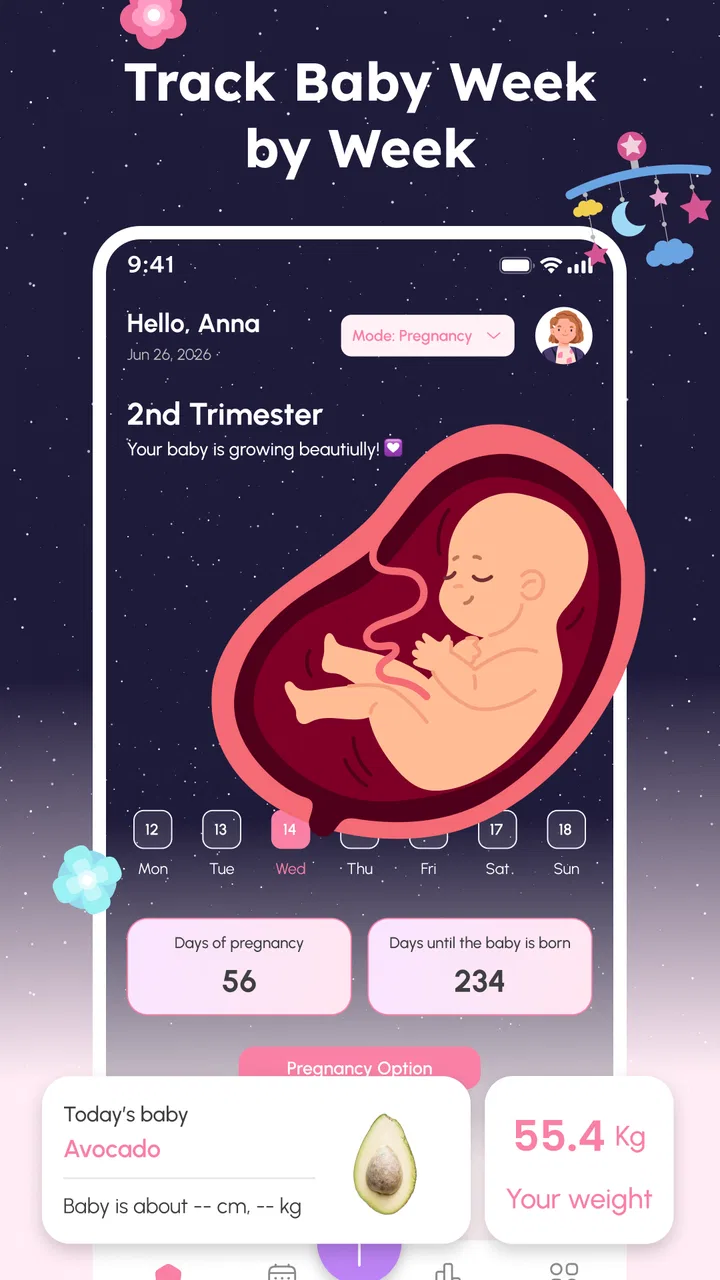
Pregnancy apps are most useful when they reduce small moments of uncertainty rather than adding another complicated task to an already busy day. Pregnancy Tracker & Mom Care takes that practical approach. I found it best understood as a pregnancy-focused organizer for people who want one place to follow progress, keep important details in view, and build a steadier routine around appointments and everyday questions.
It is a free parenting app from ACCONS, available for Everyone, and it runs on Android devices using at least Android 9. The current release is version 1.0.4, and its audience is already fairly broad, with over one hundred thousand installs. Those details make it easy to try without a financial commitment, but the real question is whether its simple pregnancy-tracking focus fits the way you prefer to manage information.
Getting started without turning pregnancy tracking into work
My first recommendation is to treat setup as a short accuracy check, not something to rush through while distracted. Pregnancy tools depend heavily on the starting information you enter, so a small mistake at the beginning can make later progress views feel confusing. Before tapping through the opening screens, have the date information your healthcare professional has discussed with you nearby and decide which details you want to record regularly.
You May Also Like

 Blood Strike: 2.5 Anniversary
Blood Strike’s Loadouts Turn Every Drop Into a Tactical Gamble
A close look at Blood Strike’s custom loadouts: how fast access to signature weapons reshapes its battle royale rhythm, rewards preparation, and narrows the gap between fights.

 Pandora - Music & Podcasts
Pandora’s Music Is Easy to Start, but Harder to Recover
Pandora’s strength is its low-effort path from a seed to a station. Its weak spot is how much confidence it asks you to place in connection, setup, and quiet recovery.

 8 Ball Pool
 Is Built on Rivalries, Rematches, and Routine
A close look at the rivalries, rematches, shared routines, and unanswered safety questions that turn a quick pool match into a persistent mobile community.

 Samsung Music
’s Quiet Strength Is Playing What You Already Own
Its reach comes less from spectacle than from dependable access to a personal library. That simplicity is both the app’s strongest retention engine and its ceiling.

 AccuWeather: Weather Radar
AccuWeather Review: A Quick, Clear Forecast for Everyday Decisions
For everyday plans, the best forecast is the one you can understand quickly. AccuWeather makes rain timing, radar, and local conditions easy to act on, with a few trade-offs.

 Hill Climb Racing
Why Hill Climb Racing Still Turns Crashes Into One More Run
A tiny car, a bumpy hill and one more upgrade: Hill Climb Racing keeps resurfacing because its simple chaos makes every near-miss feel personal.
More From Our News Desk



The most common place users get stuck is not necessarily a broken screen. It is uncertainty about which date to use, whether to enter an estimate, or how to interpret a result that does not match a calendar or a clinic conversation. If the app presents a date field or a pregnancy-progress prompt, read the wording carefully and use the same reference point consistently. Do not switch between different dates simply because one produces a more familiar result.
I also suggest checking the device date and time before blaming the tracker for an unexpected change. An incorrect phone clock, a recently restored device, or a date that was edited manually can make any time-based app look unreliable. This is a simple check, but it is especially worthwhile when the displayed progress seems to jump after a restart.
Because the app is free, it is approachable for someone who wants to test a tracker before committing to a more elaborate pregnancy platform. That simplicity can be a strength during setup. You are less likely to postpone using it because you are comparing subscription tiers or trying to decide which premium module matters most. On the other hand, anyone expecting a full medical record system may find the initial experience too lightweight.
After installation, I would spend a few minutes locating the main progress area and any places intended for personal notes or planning. Even when an app looks straightforward, knowing where those sections are prevents a common mistake: entering information once and then forgetting where it lives. A tracker becomes useful only when returning to it feels quicker than searching through messages, paper notes, or a general calendar.
Small setup habits that prevent larger confusion
Use one source of truth for pregnancy dates. If your clinician gives you an updated estimate, change your record deliberately and make a note of why you changed it. That habit is more useful than repeatedly adjusting entries until the screen matches an expectation. It also gives you a clear explanation if a partner or family member sees a different week or milestone in another app.
Keep the first session focused. Enter the essential information, look around the app, and then close it. Trying to fill every possible note immediately can make the process feel like paperwork. I prefer returning later with a specific purpose, such as checking progress, preparing for an appointment, or recording a question while it is still fresh.
If the app offers a choice between optional details and core pregnancy information, start with the core information. Optional entries are easier to assess after you understand how the main tracker responds. This is one of the less obvious advantages of a staged setup: if something looks wrong, you have fewer possible causes to investigate.
Android compatibility is also worth checking before installation. The minimum requirement is Android 9, so an older phone may be unable to install or update it. If the app is missing from the store on a particular device, confirm the operating system first rather than assuming the application itself has disappeared. On a supported phone, keeping the operating system and the app current is a sensible first step when screens behave differently from expected.
Recovering when the routine breaks
Pregnancy does not always follow a neat logging schedule, and neither does daily life. If you miss several days, I would not try to reconstruct every detail from memory just to make the record look complete. Resume with the information you know is reliable, then use a note to mark anything that is approximate. A partly accurate record is more useful than a polished-looking one built from guesses.
When a progress display seems frozen, begin with ordinary recovery steps: leave the screen, reopen the app, and check whether the phone has a stable date and time. If the issue remains, restart the device and confirm that the installed version is still 1.0.4 or a later available release. These steps will not solve every problem, but they separate a temporary display issue from a consistent data problem without immediately deleting anything.
Be careful with storage cleanup. Clearing an app's data is not the same as clearing temporary files; it can remove locally stored information. I would avoid that step until you understand what the phone will erase and whether you have another record of your entries. Reinstalling should also be a last resort, especially if the app contains personal notes that you cannot recreate easily.
A safer recovery workflow is to write down important dates and questions before making major changes. Then, if you need to reset the app, you are not relying on memory. This is particularly helpful for appointment preparation: the value of a tracker is not only what it displays, but also the context you bring to a conversation with your healthcare professional.
If an entry appears duplicated, resist the temptation to keep tapping the save button. First return to the main screen and see whether the original action completed after a delay. Repeated taps can turn a slow response into multiple entries. When you are on an unstable connection or the phone is busy, waiting a moment is often better than trying the same action several times.
Separating app trouble from pregnancy questions
A tracker can organize information, but it cannot confirm whether a symptom is normal or provide personal medical advice. If a screen, reminder, or progress label worries you, use it as a prompt to ask a qualified healthcare professional rather than as a diagnosis. The app should support your conversations, not replace them.
This distinction matters when the displayed timing differs from what you heard at a clinic. Pregnancy dating can be revised for medical reasons, and an app may simply be following the information entered into it. In that situation, the disagreement is not proof that the software is malfunctioning. Record the clinician's guidance, update the app carefully if appropriate, and keep the explanation for the change in your notes.
Phone-level problems can also look like app problems. Low storage, aggressive battery management, an outdated system, or a device that has not been restarted for a long time may affect responsiveness. Check those basics before assuming that the tracker has lost information. If other apps are also slow or closing unexpectedly, the wider device environment deserves attention.
Privacy is another reason to use a measured workflow. Pregnancy information is personal, so I would avoid entering details on a shared phone or while signed into an account that other people routinely use unless you are comfortable with that arrangement. I would also keep a separate, secure record of information that matters for appointments. That is not a criticism of this particular app; it is a sensible precaution for any digital health organizer.
Where this app fits among the usual alternatives
Compared with a paper notebook, Pregnancy Tracker & Mom Care is more convenient for information that changes over time and is easier to check on a phone. A notebook still has advantages when you want free-form writing, sketches, or a record that is independent of a device. I would choose the app for quick progress checks and the notebook for longer reflections or backup notes.
A general calendar is better for fixed appointments, reminders shared with a partner, and events unrelated to pregnancy. The tracker is a more natural home for pregnancy-specific progress. In practice, the two can work together: use the calendar for the appointment itself and the pregnancy app for questions or details you want to remember before attending.
Large pregnancy platforms may offer a wider range of educational material, community features, or connected services. That can be attractive if you want an all-in-one experience. The trade-off is greater complexity and more time spent navigating sections you may never use. This app makes more sense for someone who wants a focused companion rather than a broad content hub.
I would skip it if your main requirement is a substitute for clinical monitoring, a shared family dashboard, or a detailed medical record with professional review. I would also look elsewhere if you dislike entering information on a phone or need a tool built specifically around a healthcare provider's workflow. The app's value is practical organization, not clinical authority.
Everyday uses that make the tracker worthwhile
One realistic scenario is the evening before an appointment. Instead of trying to remember every question from the previous week, I would open the tracker, review the progress information, and add a short list of concerns or observations. The next morning, that list can guide the conversation. This turns the app into a memory aid rather than another source of passive reading.
Another useful routine is a weekly check-in at the same time each week. Keep it brief: review the current progress, update only what has changed, and note anything that needs discussion. A consistent routine reduces the temptation to open the app repeatedly throughout the day and helps you notice meaningful changes in your own questions and priorities.
For a partner or support person, the app can help create a shared vocabulary around dates and milestones, but I would not assume that everyone should edit the same record. One person maintaining the primary information can prevent conflicting updates. Share the relevant points in conversation, and agree on which date or guidance came from the clinic.
A less obvious use is troubleshooting your own expectations. If your mental picture of pregnancy progress comes from several calendars, websites, and conversations, small differences can feel alarming. Keeping one carefully maintained tracker gives you a stable reference point. It does not make the information medically definitive, but it can reduce needless confusion caused by comparing unrelated tools.
The app is also useful as a bridge for people who are new to pregnancy tracking. Rather than learning a complex platform with many sections, you can begin with the central task of following progress and organizing questions. If your needs grow later, you can decide whether a more specialized service is justified instead of paying for features before you know you need them.
What I would improve in the user experience
The biggest friction is the unavoidable sensitivity of the starting information. A tracker can feel wrong even when it is faithfully calculating from an incorrectly entered date. Clear wording around dates and a visible way to review the original setup would make this kind of app easier for nervous first-time users. When you are tired or distracted, reassurance comes from being able to inspect your inputs quickly.
I also prefer apps that make recovery feel safe. Before changing or resetting anything, users should understand whether their entries are stored locally and what a reset might remove. Since pregnancy notes can be difficult to recreate, I would treat any destructive troubleshooting step cautiously and keep important information elsewhere.
There is a trade-off between a calm, focused interface and a feature-heavy one. Adding more content could make the app more competitive with comprehensive pregnancy platforms, but it could also bury the simple tracking experience that makes it approachable. In my view, the best direction would be clearer setup guidance and smoother recovery rather than an indiscriminate pile of extra sections.
Version 1.0.4 suggests a relatively early stage of the product's life, so I would keep expectations realistic about polish and long-term refinement. That does not make it a poor choice; it simply means I would pay attention to how reliably it fits my routine over several weeks. An app can be useful on day one and still reveal small annoyances once you depend on it regularly.
My practical verdict for expecting parents
Pregnancy Tracker & Mom Care is a sensible free starting point for focused pregnancy organization. I like it most for quick progress checks, appointment preparation, and keeping one consistent reference instead of juggling scattered notes. Its accessibility, Everyone content rating, and support for Android 9 or newer make it easy for many people to try.
Use it deliberately: enter dates carefully, keep a backup of information that matters, and treat unusual symptoms or medical disagreements as matters for a healthcare professional. If the app appears to be misbehaving, check the phone's date, system version, storage, and general stability before deleting anything. Those habits prevent a small technical misunderstanding from becoming a lost record.
For someone who wants a comprehensive medical platform, a social pregnancy community, or advanced family coordination, another option may be a better match. For someone who wants a straightforward companion that helps turn pregnancy progress and appointment questions into a manageable routine, I think this app is worth trying. I would recommend it to a friend who values simplicity, provided they use it as an organizer and conversation aid—not as a replacement for professional care.
FAQs for Pregnancy Tracker & Mom Care
01What is Pregnancy Tracker & Mom Care used for?
Pregnancy Tracker & Mom Care is designed to help expectant parents follow pregnancy progress from the early weeks through delivery. It may provide weekly information about fetal development, pregnancy symptoms, estimated due dates, appointment reminders, checklists, kick counters, contraction tools, and general maternity guidance. The app is best viewed as an educational and organizational companion rather than a replacement for professional prenatal care.
02How accurate is the pregnancy week and due-date calculator?
The app estimates pregnancy weeks and the expected delivery date using information such as the first day of your last menstrual period, cycle length, or a date provided by your healthcare professional. These calculations are useful for tracking general progress, but they are not exact predictions. Ovulation can vary, and your doctor or midwife may adjust the due date after an ultrasound or clinical assessment.
03Can Pregnancy Tracker & Mom Care replace advice from a doctor or midwife?
No. Pregnancy Tracker & Mom Care can offer general educational content, reminders, and tracking tools, but it cannot diagnose conditions or evaluate individual risks. Pregnancy symptoms and complications differ from person to person, so medical decisions should always be discussed with a qualified healthcare professional. Seek urgent care for severe pain, heavy bleeding, breathing problems, reduced fetal movement, or any symptom that feels dangerous.
04What information or permissions might the app require?
Depending on the version and device, the app may ask for details such as your pregnancy dates, symptoms, weight, appointments, or personal preferences so it can personalize its calculations and reminders. It may also request notification access for alerts. Before entering sensitive information, review the app’s privacy policy, data-sharing practices, account requirements, advertising policy, and available deletion options in the store listing or within the application.
05Is Pregnancy Tracker & Mom Care free to download and use?
The app may be available to download at no initial cost, but some features can depend on the current version, platform, region, subscriptions, or in-app purchases. Premium content might include expanded guides, additional tracking tools, customization, or an ad-free experience. Check the Google Play Store or Apple App Store listing before downloading to confirm pricing, trial terms, recurring billing details, and cancellation instructions.
Pros
- Clear week-by-week pregnancy guidance for expecting parents.
- Useful reminders for appointments
- tests
- and prenatal vitamins.
- Tracks symptoms
- weight
- mood
- and other pregnancy milestones.
- Includes practical tips for nutrition
- exercise
- and baby development.
- Simple interface makes daily updates quick and easy.
Cons
- Some features or content may require a premium subscription.
- Information cannot replace advice from a qualified healthcare professional.
- Personalized recommendations depend on the accuracy of entered data.
- Frequent notifications may feel excessive for some users.
- Privacy concerns may arise when storing sensitive pregnancy information.

Pregnancy Tracker & Mom Care
Gallery